
You can return a KVM Root Server 3.5 or a web hosting package immediately at any time. You get the remaining term back pro rata as special credit, minus a return fee of 0.50 EUR. Smart Value, Smart Essential, dedicated servers and licenses can only be cancelled at the end of the term.
Which servers can I return immediately?
| Product | Immediate return |
|---|---|
| KVM Root Server 3.5 | yes, at any time |
| KVM Configurable 2.0 and 3.0 (existing servers) | yes, at any time |
| Web hosting (Plesk) | yes, at any time |
| Smart Value | no, only at the end of the term |
| Smart Essential | no, only at the end of the term |
| Dedicated server | no, only at the end of the term |
| Licenses | no, only at the end of the term |
Ordered by mistake? Within the first 30 minutes after your order you can return any server except dedicated servers. For servers with immediate return we currently waive the return fee during the first 24 hours as a goodwill gesture. This way you can undo a wrong order yourself without opening a ticket.
What do I get back?
The paid remaining term is calculated to the day and credited minus the 0.50 EUR return fee. This credit is special credit: you can use it for new services, but it is not paid out. You see the exact amount in the cancellation management before you submit.
How to return your server immediately
- Log in at vionity.de and open your server.
- Click the button at the top for returning the server or letting it expire. The cancellation management opens.
- Select „Immediate Cancellation“ as the cancellation type. On the right you see the calculation and the credit you get back.
- Choose a cancellation reason, rate hosting and support and tick the confirmation box.
- Click „Confirm Cancellation“. After a few seconds the server is deleted and the credit is booked.
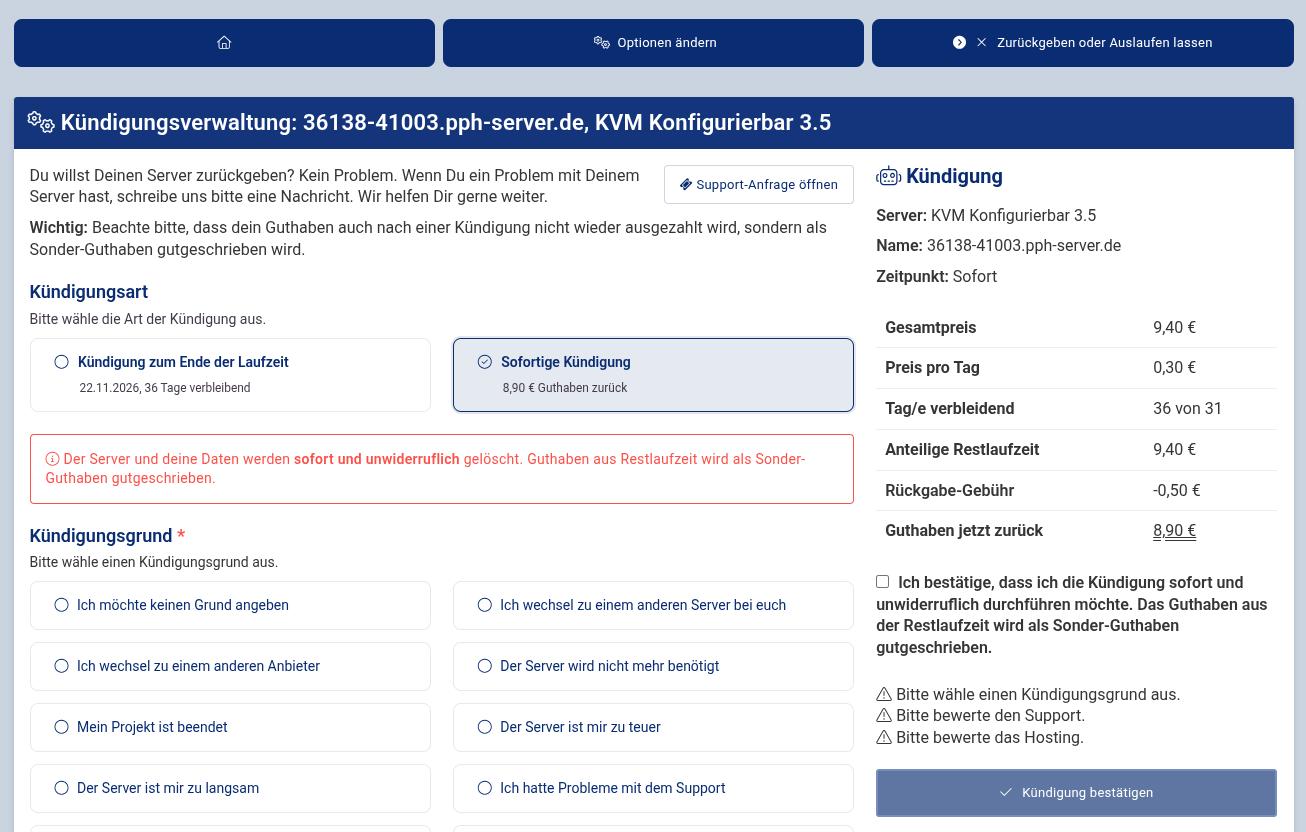
Warning: Server, data and backups are deleted immediately and permanently. Save everything you still need beforehand.
Cancelling at the end of the term or simply letting the server expire is explained in Do I have to cancel my prepaid server?
 EN:
How can I cancel my server immediately and get credit back?
EN:
How can I cancel my server immediately and get credit back?